


Lorem ipsum dolor sit amet, dolor siterim consectetur adipiscing elit. Phasellus duio faucibus est sed facilisis viverra. Umero praesent nec accumsan nibh, eu grav da metus.
This is a demo store for testing purposes — no orders shall be fulfilled. Dismiss
 Jamaica
Jamaica
Jamaica
3 min read
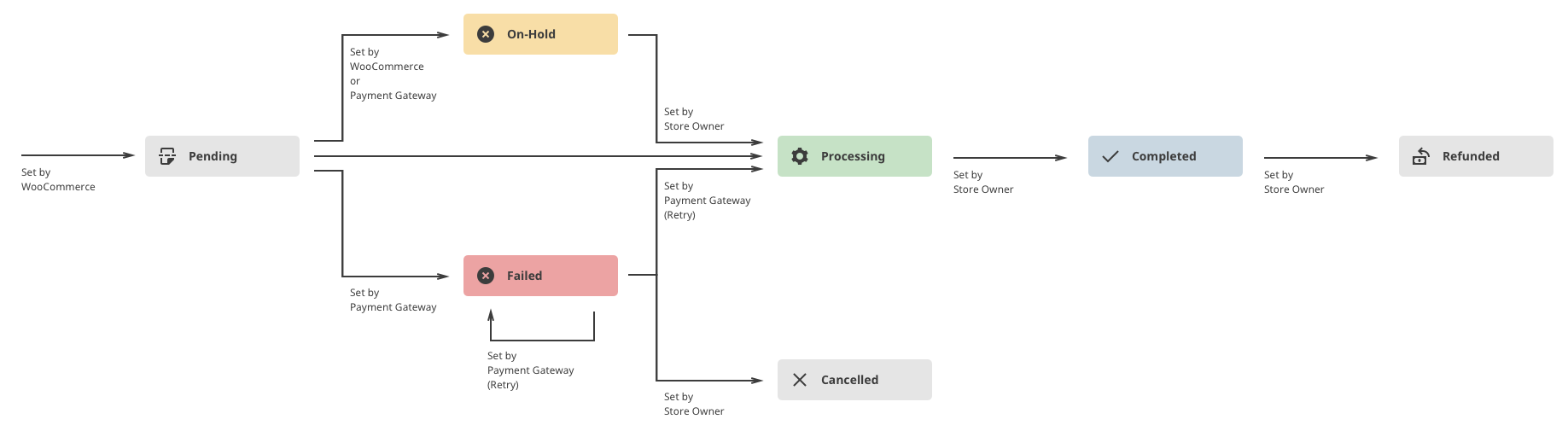
After placing an order, you’ll see different shipping statuses as your package moves from the seller to you.
Each status tells you what’s happening right now and what to expect next.
You can view your shipping status at any time:


What it means:
Your order was created, but payment hasn’t been completed.
What to expect:
⏳ Complete payment to move the order forward.
What it means:
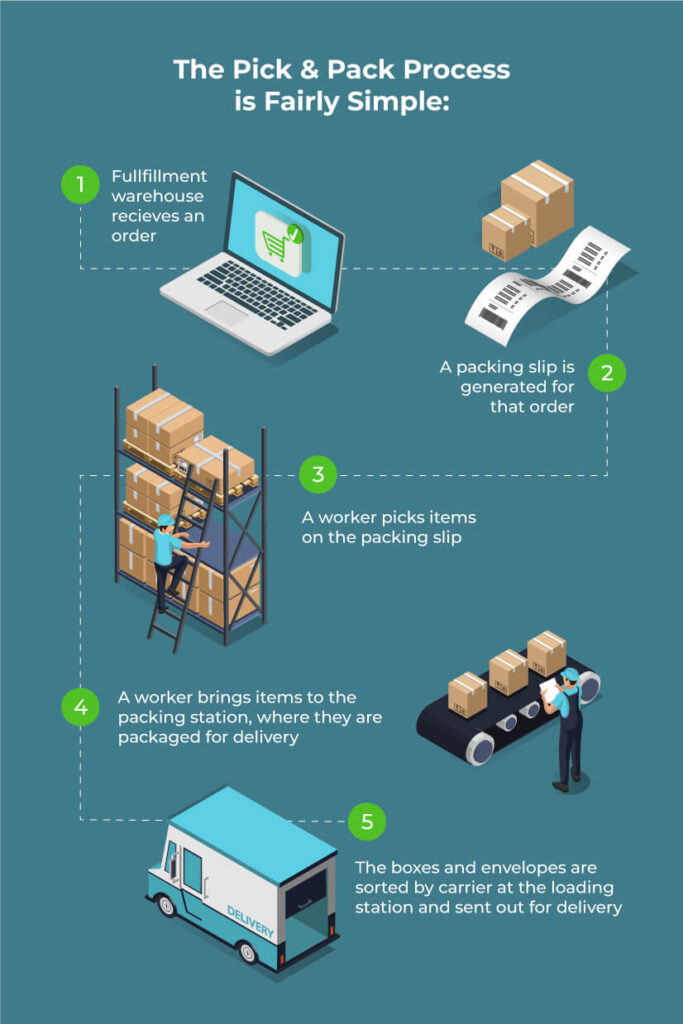
Payment is confirmed and the seller is preparing your order.
What’s happening now:
📦 Most orders spend the most time in this stage.
What it means:
The order needs manual review before shipping.
Common reasons:
🔔 You may be contacted if more information is needed.
What it means:
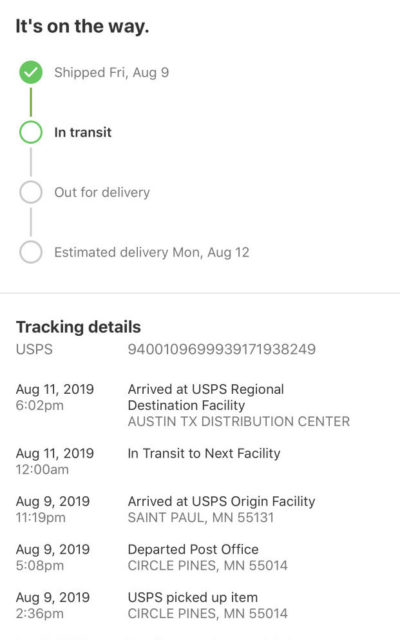
Your order has left the seller and is on its way to you.
What to expect:
🚚 Tracking updates may not be real-time.

What it means:
Your order is scheduled to be delivered today or very soon.
What to do:
📍 Delays can still happen due to traffic or weather.
What it means:
The courier or seller marked the order as delivered.
What to do:
📦 Sometimes packages are left in secure locations.


What it means:
The order is officially closed and marked as fulfilled.
What to know:
✅ This is the final status for most orders.
What it means:
The order was cancelled before shipping.
Possible reasons:
🚫 Cancelled orders will not be delivered.
What it means:
Your payment has been returned.
What to expect:
💳 Banks may take a few days to process refunds.
What it means:
The payment attempt was unsuccessful.
What to do:
⚠️ No shipment starts until payment is successful.
Contact the seller if:
Contact Kingston Express Support if:
📌 Always include your order number.
Understanding shipping statuses helps you know exactly where your order is and when to take action. Most issues are resolved quickly with clear communication 🚚


This chat uses automated responses for general guidance. For binding terms, please refer to our official policies.
Start A Conversation
Click here to chat with me!
Search our website now
Latest Products
Latest Posts
Lorem ipsum dolor sit amet, dolor siterim consectetur adipiscing elit. Phasellus duio faucibus est sed facilisis viverra. Umero praesent nec accumsan nibh, eu grav da metus.
B&O Play – Best Headphone For You
Lorem ipsum dolor sit amet, dolor siterim consectetur adipiscing elit. Phasellus duio faucibus est sed facilisis viverra. Umero praesent nec accumsan nibh, eu grav da metus.
Harman Kadon Onyx Studio Mini, Reviews & Experiences
Lorem ipsum dolor sit amet, dolor siterim consectetur adipiscing elit. Phasellus duio faucibus est sed facilisis viverra. Umero praesent nec accumsan nibh, eu grav da metus.
DeerCo – A New Look About Startup In Product Manufacture Field
Lorem ipsum dolor sit amet, dolor siterim consectetur adipiscing elit. Phasellus duio faucibus est sed facilisis viverra. Umero praesent nec accumsan nibh, eu grav da metus.
Tips how to choise a perfect watch foractive guys
Lorem ipsum dolor sit amet, dolor siterim consectetur adipiscing elit. Phasellus duio faucibus est sed facilisis viverra. Umero praesent nec accumsan nibh, eu grav da metus.

Subscribe to the Martfury mailing list to receive updates on new arrivals, special offers and our promotions.