View Categories

Why a Promo Code Isn’t Working on Kingston Express

3 min read

Promo codes are a great way to save money, but sometimes they don’t apply as expected.
This guide explains the most common reasons promo codes fail, what to check, and how to fix the issue.


Where Promo Codes Are Applied #

Promo codes must be entered before payment:

  • On the Cart page
  • Or at Checkout under “Have a promo code?”
https://media.tychesoftwares.com/wp-content/uploads/Get-Coupon-Code-Via-URL-and-apply-in-the-WooCommerce-Checkout.png
https://files.wpfixit.com/wp-content/uploads/2022/05/Change-WooCommerce-Coupon-Error-Messages.webp

📌 If payment is already completed, promo codes cannot be applied.


Most Common Reasons a Promo Code Isn’t Working #


1. The Promo Code Has Expired #

What happens:
The system no longer accepts the code.

What to do:

  • Check the promotion’s end date
  • Look for newer or active promo codes

Most promo codes are time-limited.


2. The Code Was Entered Incorrectly #

What happens:
Even small errors prevent the code from applying.

Check for:

  • Misspelled characters
  • Extra spaces
  • Uppercase or lowercase requirements

✔ Try copying and pasting the code directly.


3. The Item or Seller Is Not Eligible #

Because Kingston Express is a multivendor marketplace:

  • Some promo codes apply only to specific sellers
  • Some apply only to selected products or categories

🛒 If your cart contains items from different sellers, the discount may apply only to part of the order.


4. Minimum Order Value Was Not Met #

What happens:
The cart total is below the required minimum.

Example:

  • Promo requires $5,000 minimum
  • Your cart total is $4,200

📌 Shipping fees usually do not count toward the minimum.


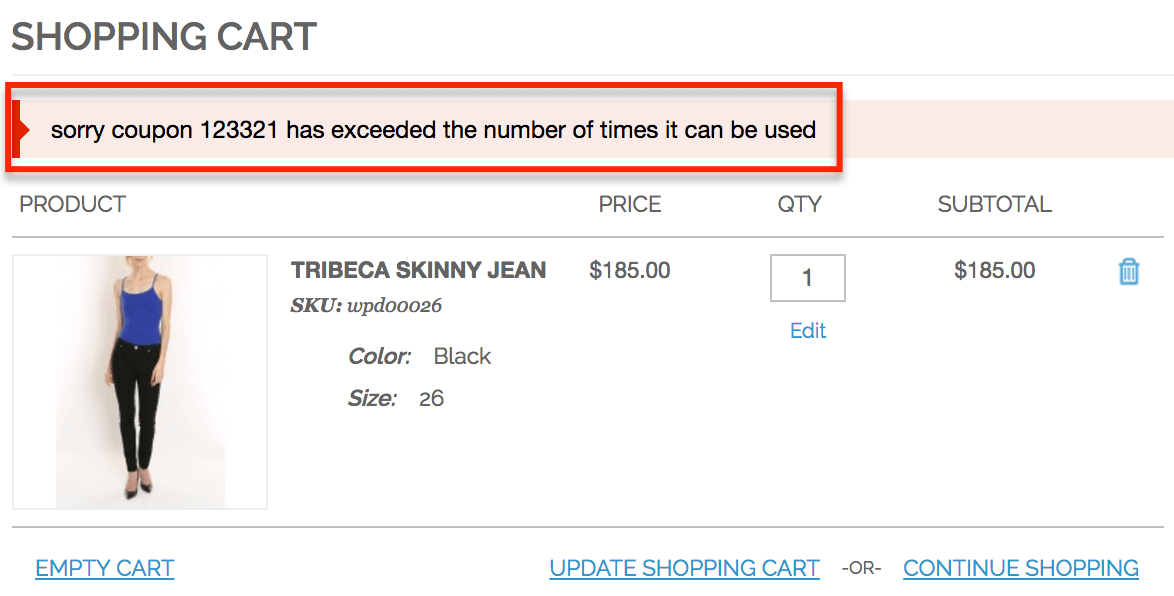
5. The Promo Code Has Already Been Used #

Some promo codes:

  • Are one-time use only
  • Can only be used once per account or customer

🔒 If already redeemed, the system will reject it.


6. Promo Codes Can’t Be Combined #

What happens:
Another discount is already applied.

Examples:

  • Sale price items
  • Automatic discounts
  • Other promo codes

⚠️ Most promo codes cannot be stacked.


7. Promo Code Doesn’t Apply to Shipping #

Some codes:

  • Apply only to item prices
  • Do not discount shipping fees

🚚 Shipping discounts must be clearly stated.


8. Wallet, Points, or Gift Card Was Applied First #

https://scx2.b-cdn.net/gfx/news/hires/2024/new-study-reveals-loop.jpg
https://cdn.prod.website-files.com/63c027824a0bc7d6f2085462/6486e88c372da9713ce42adc_ShopifyCheckoutExtensionBlogBannerV11k.jpg

In some cases:

  • Promo codes must be applied before wallet, points, or gift cards
  • Applying another payment method first may block the discount

💡 Try removing wallet/points, apply the promo code, then reapply payment.


Step-by-Step Checklist to Fix Promo Code Issues #

  1. Remove any existing promo codes
  2. Re-enter the code carefully
  3. Confirm the item and seller are eligible
  4. Check minimum order requirements
  5. Apply the code before payment

🔄 Refresh the cart and try again if needed.


If the Discount Still Doesn’t Apply #

Before contacting support:

  • Review the promo terms
  • Take a screenshot of the error message
  • Confirm the promo code is still active

When to Contact Kingston Express Support #

Contact support if:

  • A valid promo code isn’t applying correctly
  • The discount disappeared after checkout
  • You were charged the wrong amount

📌 Include screenshots, the promo code used, and your order details.


Helpful Tips for Using Promo Codes #

✔ Apply promo codes early
✔ Read promotion terms carefully
✔ Watch for seller-specific restrictions
✔ Don’t stack multiple discounts
✔ Check banners or emails for active promos


Final Tip #

Most promo code issues are caused by eligibility rules or timing. Taking a moment to review the promo details usually solves the problem quickly 💸

Leave a Reply

Your email address will not be published. Required fields are marked *

Main Menu