View Categories

What Happens If Dispatchment Inventory Runs Out

3 min read

(Dispatched by Kingston Express)

Running out of inventory in a dispatchment center can happen — especially when a product sells faster than expected.
The good news: Kingston Express has systems in place to prevent overselling and protect both sellers and customers.

This article explains what happens automatically, how it affects your listings, and what you should do next.


What Does “Dispatchment Inventory Runs Out” Mean? #

https://cms.ar-racking.com/uploads/2021/11/rotura-2023.jpg
https://cdn.prod.website-files.com/601411ff11c3efbd2603b7c9/685882b99dc863770499e287_62d138cbe5d9386a0c972444_different%2520labels-min.png

This means:

  • All units you assigned to a Kingston Express dispatchment center have been sold
  • There is no remaining dispatchment stock for that product

📦 This only affects inventory stored with Kingston Express — not seller-held stock.


What Happens Automatically (System Behavior) #

When dispatchment stock reaches zero:

✅ Orders Stop Automatically #

  • New orders for Dispatched by Kingston Express are paused
  • Customers cannot buy what isn’t available

🚫 Overselling is prevented.


🔄 Product Status Updates #

Depending on your setup:

  • The product may show as Out of Stock, or
  • The Dispatched by Kingston Express option is temporarily unavailable

🛒 Customers won’t be charged for unavailable items.


What Customers See #

https://wizishop.com/media/63df6939c701f0177fcd42c8/v1/out-of-stock-products-wizishop.jpg
https://canada1.discourse-cdn.com/shopifyforum/optimized/3X/c/2/c2673163732804ccc6da781ce0c4bf748f920aa8_2_1024x625.png

Customers may see:

  • “Out of Stock” message, or
  • The product hidden from search, or
  • Dispatchment option removed temporarily

📌 This protects your store rating and customer trust.


Does This Affect Existing Orders? #

❌ No — existing orders are safe #

  • Orders placed before stock ran out are still fulfilled
  • Kingston Express completes delivery as normal

Only new orders are affected.


Can the Product Still Be Sold Another Way? #

Yes — depending on your settings:

Option 1: Seller-Managed Delivery #

If enabled:

  • Customers may still order using seller-managed delivery
  • You handle delivery yourself

Option 2: Pickup #

If pickup is enabled:

  • Customers may choose store pickup

📌 Dispatchment and seller-held stock are separate.


What You Should Do Immediately #

https://eswap.global/wp-content/uploads/2021/03/Inventory-Replenishment-1024x427.png
https://www.extensiv.com/hubfs/Skubana/Blog%20Pages/Imported_Blog_Media/Inventory-Restocking-2-Oct-12-2022-05-41-21-42-PM.jpg

1️⃣ Check Dispatchment Stock Levels #

  • Log in to your Seller Dashboard
  • Review dispatchment inventory

2️⃣ Prepare Replenishment Inventory #

  • Select the quantity you want to restock
  • Ensure products meet dispatchment rules

📦 Only send approved quantities.


3️⃣ Submit a Replenishment Request #

  • Follow Kingston Express instructions
  • Wait for confirmation before sending stock

Replenishment is processed after inventory is received and verified.


What Happens After You Replenish Stock? #

Once new inventory is received:

  • Dispatchment stock is updated
  • Dispatched by Kingston Express becomes active again
  • Customers can place orders normally

🚚 Sales resume automatically.


What If You Don’t Replenish? #

If you don’t restock:

  • Dispatchment fulfillment remains unavailable
  • You may miss sales opportunities
  • Product visibility may decrease

📉 Fast-moving products should always be replenished.

How to Prevent Running Out of Dispatchment Inventory #

https://www.nudgify.com/wp-content/uploads/2019/11/low-stock-notification.png
https://learn.microsoft.com/en-us/dynamics365/intelligent-order-management/media/inventorydashboard.png

✔ Monitor dispatchment stock weekly
✔ Replenish before hitting zero
✔ Start with conservative quantities, then scale
✔ Watch sales velocity closely


Common Seller Mistakes #

❌ Waiting until stock hits zero
❌ Sending replenishment without approval
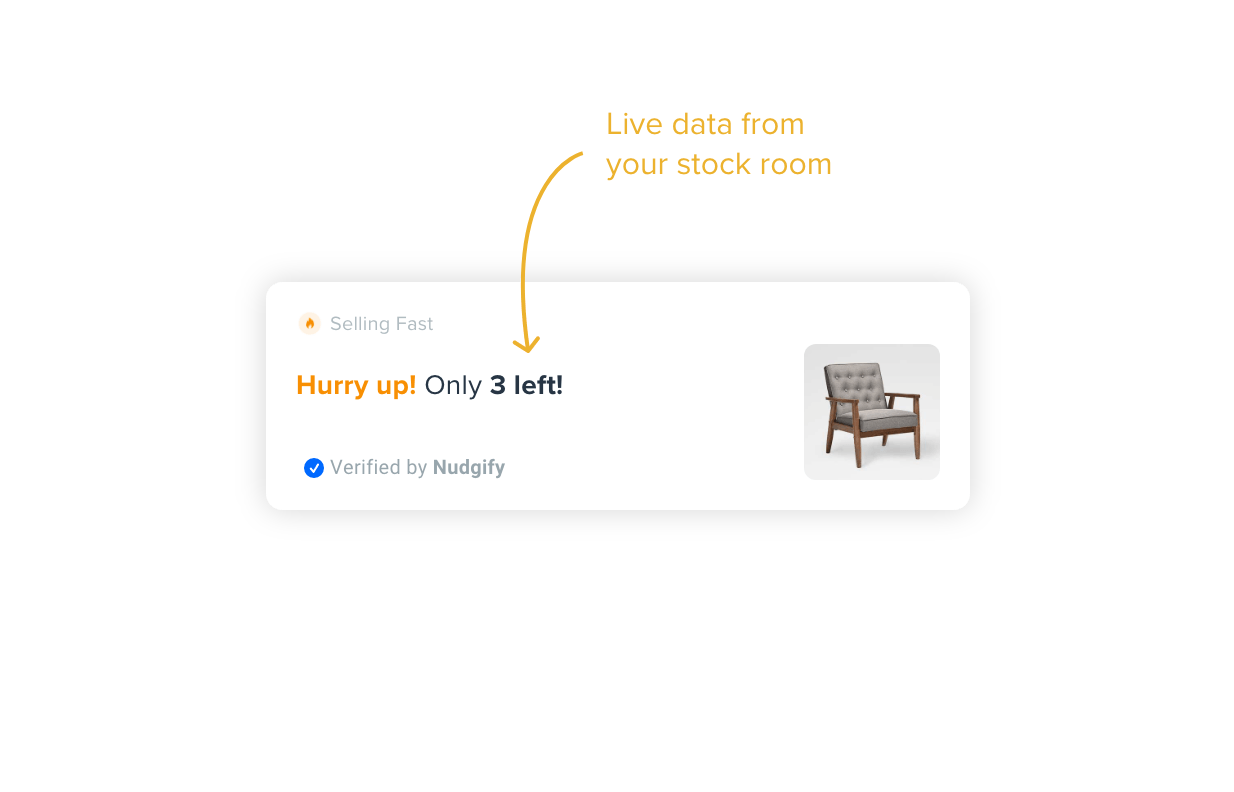
❌ Ignoring low stock warnings
❌ Assuming seller-held stock replaces dispatchment stock

⚠️ Dispatchment stock must be managed separately.


When to Contact Support #

Contact Kingston Express Support if:

  • Stock numbers look incorrect
  • Replenishment is delayed unusually
  • You’re unsure how much to send

📧 Include product name and store name.


Final Tip #

Running out of dispatchment inventory isn’t a failure — it’s a sales signal 📈
With good monitoring and timely replenishment, Dispatched by Kingston Express can keep your best products moving fast and reliably 🚚📦

Leave a Reply

Your email address will not be published. Required fields are marked *

Main Menu